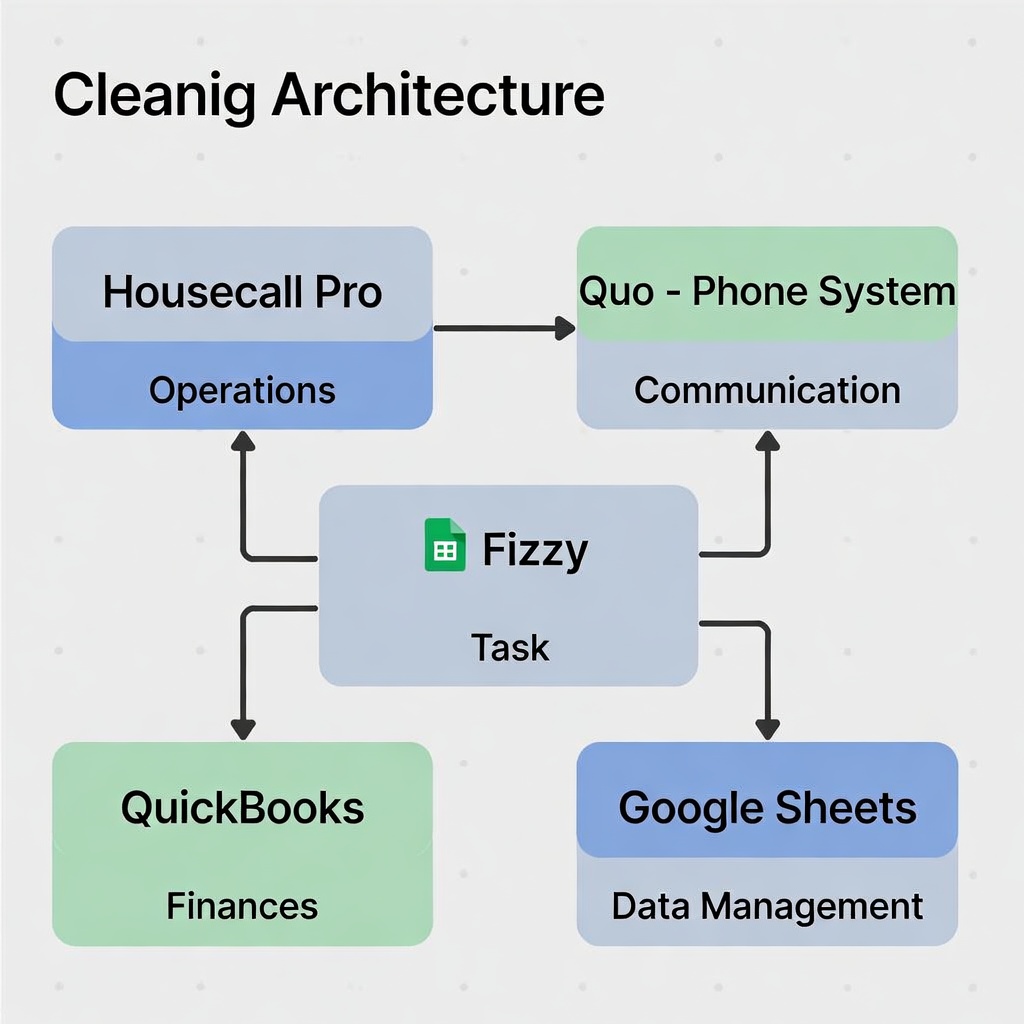
Visual overview of how all your tools connect
System Landscape
📱 Customer-Facing
- Squarespace → Public website, booking inquiries
- Quo (OpenPhone) → Phone/SMS, AI receptionist (Sona)
⚙️ Operations Core
- HousecallPro → Jobs, scheduling, crews, invoicing
- HCP Mobile → Check-in/out, GPS, photos, time tracking
- MileIQ → Mileage tracking
💰 Financial
- QuickBooks Online → Accounting, payroll, tax, reports
📊 Data & Internal
- Google Sheets → Custom tracking, inventory, reports
- Inventory Checkout App → PWA for supply tracking (GitHub Pages)
- Fizzy → Internal tasks, projects, exceptions
The Core Principle
Each system does what it's built for. No system tries to be everything.
What Each System Does
🌐 Squarespace (Public Website)
✅ Owns:
- Service descriptions
- Online booking form
- Public brand presence
❌ Does NOT:
- Schedule jobs
- Store customer data
- Handle communication
Integration: Booking form → Quo webhook → HousecallPro lead
📞 Quo (OpenPhone) - Communication Hub
✅ Owns:
- Inbound calls (AI receptionist Sona)
- SMS conversations with customers
- Call transcripts & summaries
- Shared team inbox
❌ Does NOT:
- Schedule jobs
- Store customer records
- Track job status
Integration: Customer call/SMS → Quo webhook → HousecallPro lead + Sona handles initial response
🔧 HousecallPro - Operations Core
✅ Owns:
- Customer database (CRM)
- Job scheduling & dispatch
- Recurring appointments
- Crew assignments
- Invoicing & payments
- Mobile app (crew tools)
❌ Does NOT:
- Accounting (syncs to QuickBooks)
- Internal task tracking (use Fizzy)
- Answer phones (use Quo)
- Custom tracking (use Sheets)
Integration: Job complete → QuickBooks invoice • Job data → Google Sheets • Issues → Fizzy cards
📊 Google Sheets - Data Layer
✅ Owns:
- Inventory tracking (supplies)
- Custom job metrics (time, profit)
- Weekly/monthly reports
- Supply usage logs
❌ Does NOT:
- Schedule jobs
- Handle money
- Track internal tasks
Integration: Pulls from HCP API • Triggers alerts → Fizzy cards when thresholds hit
📱 Inventory Checkout App - Supply Tracking PWA
✅ Owns:
- Supply checkout tracking
- Employee signature capture
- Offline-first operation
- Real-time inventory logging
❌ Does NOT:
- Manage job scheduling
- Track job completion
- Handle ordering supplies
How it works:
- Progressive Web App (PWA) hosted on GitHub Pages
- Works offline - syncs when back online
- Crew selects items, adds signature, submits
- Data flows: App → Google Apps Script → Google Sheets
- Sheet tracks: who, what, when, signature
- Google Sheets analyzes usage patterns
Access: https://sotoreynah.github.io/luxy-inventory/
For: Crew checking out supplies at start of shift
Why PWA: Works even when internet is spotty (syncs later automatically)
For: Crew checking out supplies at start of shift
Why PWA: Works even when internet is spotty (syncs later automatically)
📋 Fizzy - Internal Tasks & Exceptions
Key Distinction: Fizzy is for EXCEPTIONS and INTERNAL work, NOT regular customer jobs.
✅ Use Fizzy For:
- Insurance claims
- Vehicle service
- Equipment repairs
- Sourcing goods
- Customer disputes
- Team incidents
- Cost investigations
- Process improvements
❌ NOT For:
- Regular scheduled jobs
- Customer database
- Invoicing
- Crew scheduling
Integration: Receives alerts from Google Sheets • Problem flags from HCP • Tracks work ABOUT the work
💵 QuickBooks Online - Financial Core
✅ Owns:
- General ledger
- Invoicing (synced from HCP)
- Expense tracking
- Payroll
- Tax compliance
- P&L reports
❌ Does NOT:
Integration: Receives invoices from HCP auto-sync • Expense data → Google Sheets for margin analysis
The Critical Decision Rule
HousecallPro = Happy Path
Use HousecallPro for:
- ✅ Regular scheduled jobs
- ✅ Established customers
- ✅ Standard workflow (schedule → dispatch → complete → invoice)
- ✅ Recurring appointments
- ✅ Normal day-to-day operations
Fizzy = Exceptions & Problems
Use Fizzy for:
- 🔥 Anything that breaks the normal workflow
- 🔥 Non-standard operational tasks
- 🔥 Internal projects and improvements
- 🔥 Problems that need investigation
Example Scenarios
| Situation | System | Why |
|---|---|---|
| Mrs. Johnson's regular biweekly clean | HousecallPro | Happy path recurring job |
| Mrs. Johnson claims we damaged her lamp | Fizzy | Exception - insurance claim process |
| Schedule Maria for 3 jobs this week | HousecallPro | Normal crew dispatch |
| Maria was late 3 times this week | Fizzy | Performance issue to address |
| Customer books new one-time clean | HousecallPro | Standard job workflow |
| Van needs oil change this week | Fizzy | Operational maintenance task |
| Invoice customer for completed job | HousecallPro | Normal billing |
| Negotiate bulk discount with supplier | Fizzy | Business operations project |
| Crew checks out supplies for jobs | Inventory Checkout App | Daily supply tracking |
| Review supply usage trends | Google Sheets | Data analysis from checkout logs |
Integration Flow Example
Complete Customer Journey
- Customer calls → Quo (Sona answers)
- "I need a cleaning estimate" → Quo webhook → HousecallPro new lead
- Lety reviews in HCP, creates quote
- Customer accepts → Job scheduled in HCP
- Crew gets assignment via HCP mobile
- Job completes → Crew marks done in HCP
- HCP creates invoice → Syncs to QuickBooks
- Customer pays → QuickBooks records
- Google Sheet logs job metrics
- If low margin → Fizzy card created for investigation
💡 The Big Picture
HousecallPro is optimized for volume (handle 40+ jobs/week efficiently)
Fizzy is optimized for variability (handle 8 different weird things that don't fit a template)
You need both. One for the machine, one for the exceptions that prove you're dealing with real life. 🦙